Advanced Power-Saving Screensaver for Windows | Monitor Off & Auto Shutdown
Screensaver offered here can be real Screen / Power Saver. The Screensaver can be used to save electricity / power. Screensaver is easily configurable using Screen Saver properties as for other Screensavers. You can also use this Screen Saver as LogOn Screen Saver to Turn Off Screen (only turn off screen supported when working as LogOn Screensaver) whenever nobody is logged onto your computer or workstation.
How to Configure MurGee Screensaver
- Step 1: Download and install MurGee Screen Saver on Windows PC (Windows 11, Windows 8.1, Windows 10 or any other Windows Operating System).
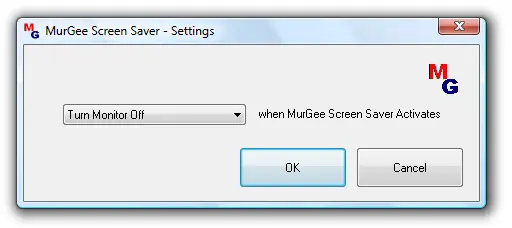
- Step 2: From MurGee Screen Saver Settings Dialog Box, select the action you would like to be performed when MurGee Screen Saver Activates.
- Step 3: From Screen Saver Properties Dialog Box, select the appropriate idle duration after which MurGee Screen Saver should work.
- Step 4: That's it, after selected duration (in Screensaver Properties), MurGee Screensaver will initiate the selected action.
- Note: Do a Test Run with Action of your choice. Test run of the screen saver can be done by clicking preview button in Screen Saver Properties.
- Note: From the Actions List, when you select Brute Action, any unsaved data may be lost, however the selected action will be performed.
- Note: Please do write to us at support@murgee.com, in case you feel that any other related feature should be there in the MurGee Screen Saver.
- Note: The Action to Log Off Signed on User, cannot be performed by MurGee Screen Saver, if screen saver is activated and no user is logged onto the computer.
- Note: In case you opt to shutdown computer, your user account must have computer shutdown rights (if you can shutdown your computer by selecting shutdown from the start menu, it should be fine).
MurGee Screensaver Settings
Given below screen shot of MurGee Screensaver displays easy to configure options for the screen saver. Other actions available include Logging of the Signed on User, Shutting Down of Computer, Displaying a Blank Screen, Hibernate Computer, and of course Shutting Down of the Monitor only without disturbing the applications running on the computer.
MurGee Screensaver Registration
The Screensaver offered here is free to try software download. The screen saver will work without any limitations upto 20 times, after which it will warn that the trial uses have been completed and the screen saver will not work afterword. There are no advertisements, no nagging screens , no locked features in the screen saver. You can register your copy of screen saver easily using credit or debit card or with a paypal account, by paying in $10.00 only and use it for upto 3 Months from the Date of Payment.
MurGee Screensaver Features
- The Screen Saver can save screen and can do many other things.
- Can be useful when you wish to do some actions when computer is left inactive.
- Offers to Shutdown, Hibernate, Lock, Computer as well.
- In order to manage your computer for idleness / inactivity, you do not need to run any other software and screen saver will only be launched when it is supposed to, as defined in Screen Saver Settings.
- Screen Savers runs after inactivity, even if no user is logged onto the computer, the Screen Saver can be configured to run and hence MurGee Screen Saver when activated by Windows, can do the action assigned from the screen saver settings.
- The Screensaver, when configured to Turn Off Screen on a Multiple Monitor Computer System would turn off all the display screens (primary display and all secondary displays) or you can control dual monitors independently using the Dual Monitor Software.